Riviera
Explore

Your car,
at a glance.

The latest fuel or battery level, range and parking location, as Renault reports them. Fill-ups, services, lease and deadlines, in one iPhone app.

Available in beta through Apple’s free TestFlight app. Coming soon to the App Store.

Independent and unofficial. Riviera is not affiliated with, endorsed by, or sponsored by Renault s.a.s. For iPhone with iOS 18 or later. Free, with no ads. Screens show fictional data.1

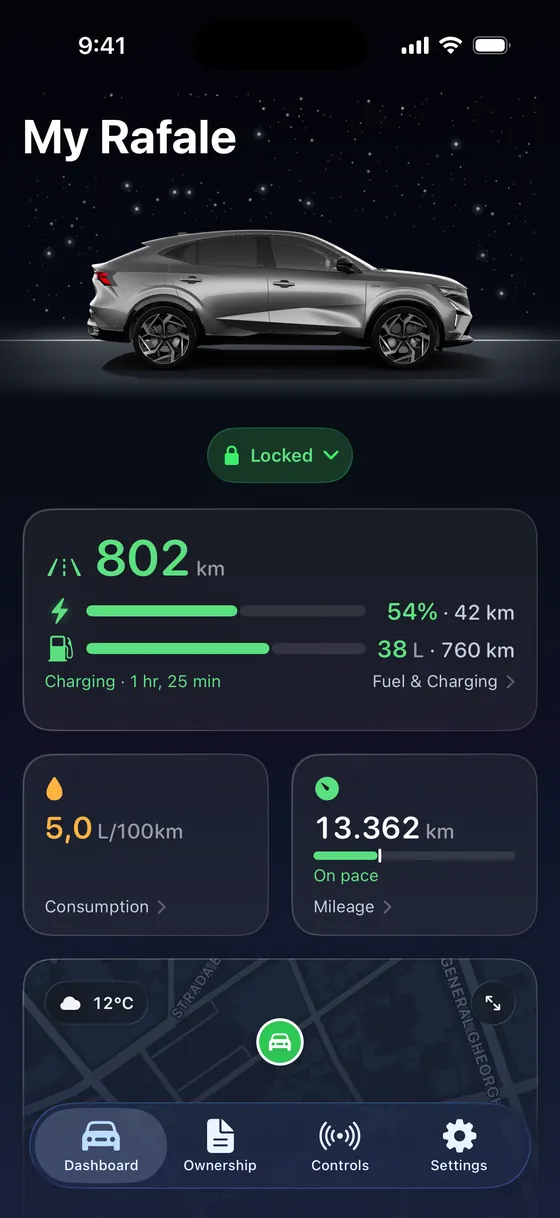
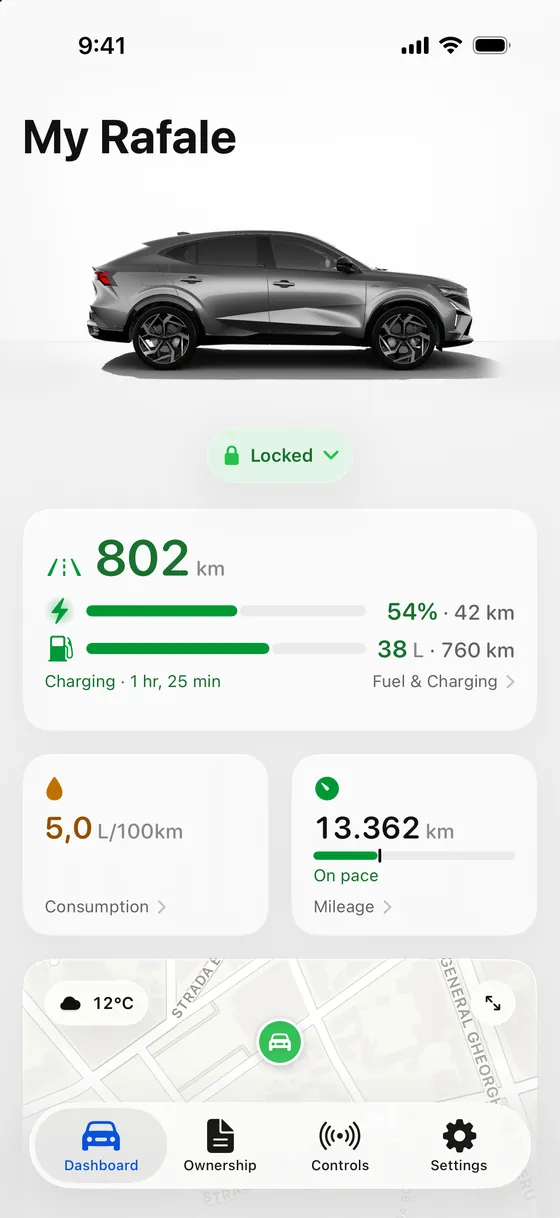
Dashboard of Riviera while the car charges: range on fuel and charge, battery and fuel levels, charging time left, the lock status, consumption, mileage and a map of where the car is parked.

What your car reports. What you keep track of. One iPhone app.

Sign in with the My Renault account you already have.

  • 21 languages

    English plus 20 more.

  • 20 currencies

    Your units too, miles included.

  • Free with no ads

    No subscription. No paid features.2

Day to day.

What you check most, one screen at a time.

Fuel and charge

How full. How far. How recent.

Riviera shows how old the latest reading is. Next to the fuel level and range: your average fuel consumption and what fuel and charging cost you.3
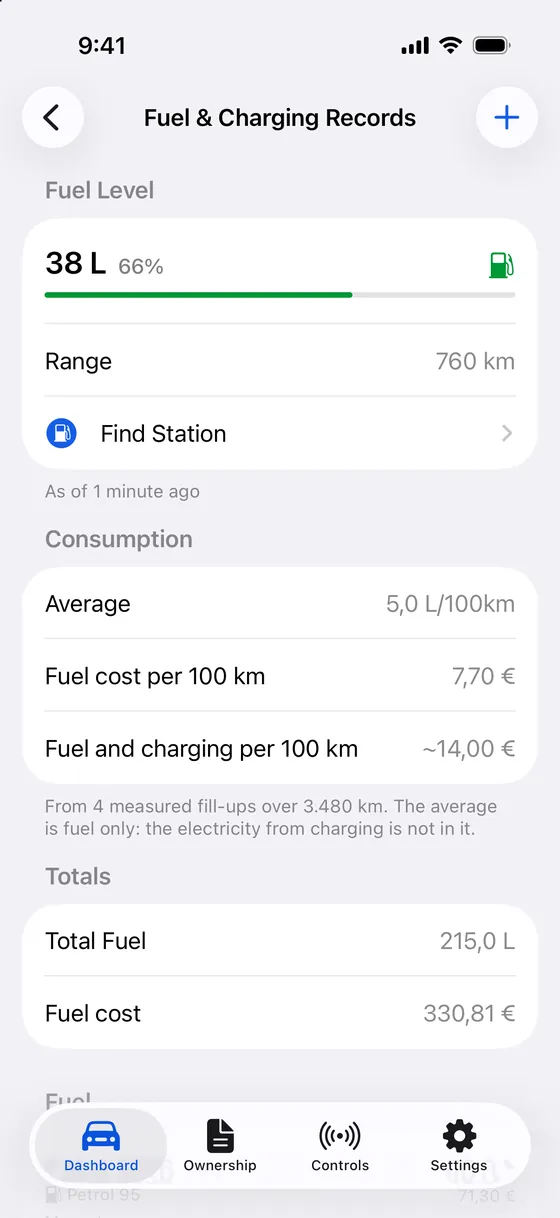
Fuel and Charging Records: fuel level, range and the time of the reading, average consumption, fuel and charging cost per distance, and fuel totals.

Controls

Horn, lights and climate, from your phone.

What works depends on your model. Climate needs a plug-in or electric car.

Sound the horn, flash the lights or start climate pre‑conditioning. Choose the cabin temperature, or schedule when it starts. On the few models that report it, the door lock card shows whether the car is locked, with the time.

Which cars accept horn and lights?

Mostly cars with OpenR Link, the touchscreen system in newer Renaults (about 2022 onward), such as the Austral, Rafale and Mégane E-Tech. Most older Easy Link and R-Link 2 cars refuse the command, and Riviera tells you so. Settings › Help & Support › Supported Vehicles shows the system for each model.
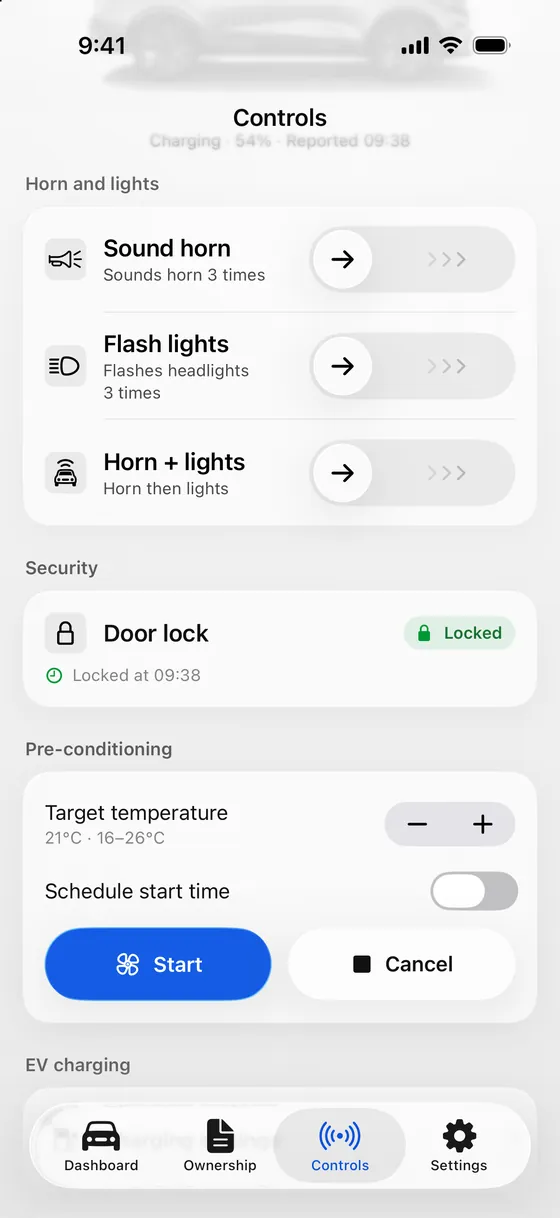
Controls screen: sound the horn, flash the lights or both, the door lock status with the time the car reported it, and climate pre-conditioning with a target temperature and a Start button.

Lease

Mileage against your allowance.

Days left and a projection to the end of the contract. The estimated cost of going over, too.
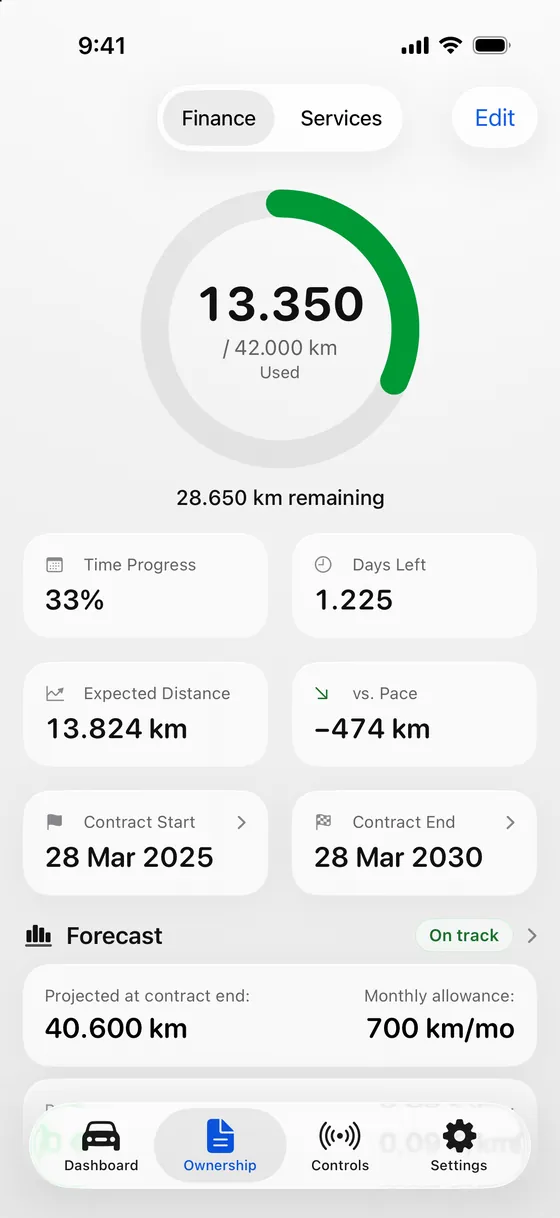
Ownership screen: a ring showing how much of the lease mileage allowance is used, with time progress, days left and a forecast.

Costs

What the car costs.

Each month, and per kilometre or mile. Fuel, charging and maintenance, next to lease, insurance and inspection.
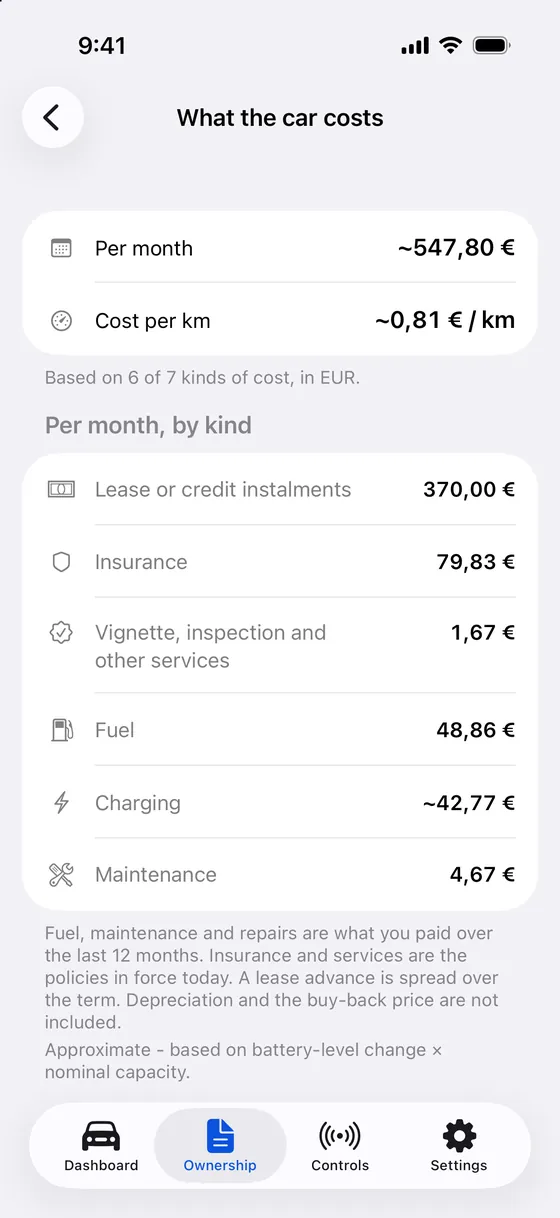
What the car costs: the monthly cost and the cost per distance, split into lease, insurance, vignette and inspection, fuel, charging and maintenance.

Documents

What is due, and when.

Your licence, inspection, insurance and road tax or vignette. Add the dates. Riviera reminds you before they fall due.
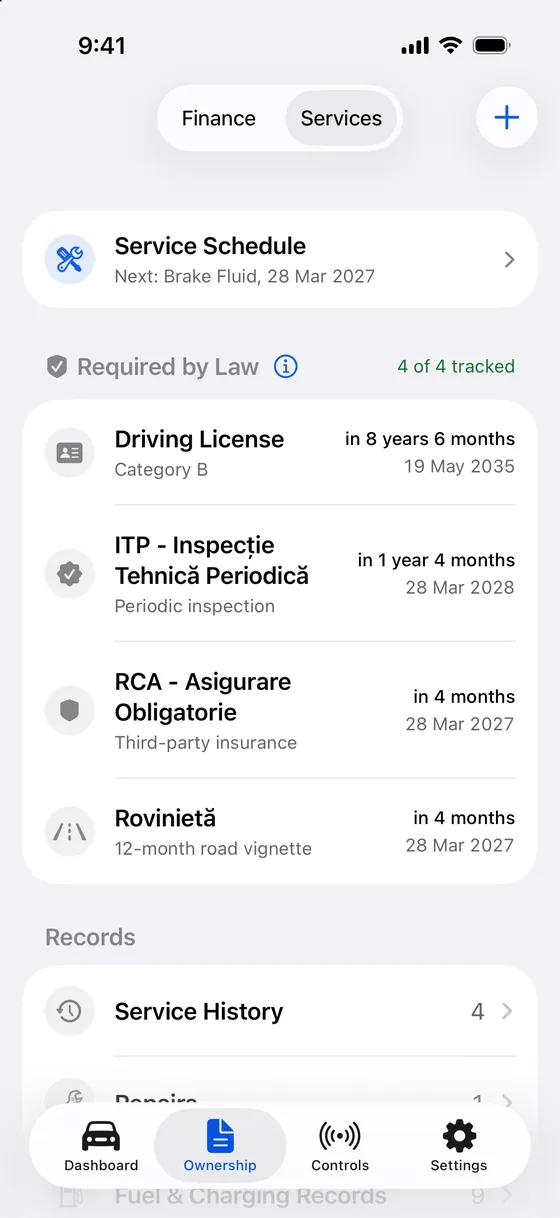
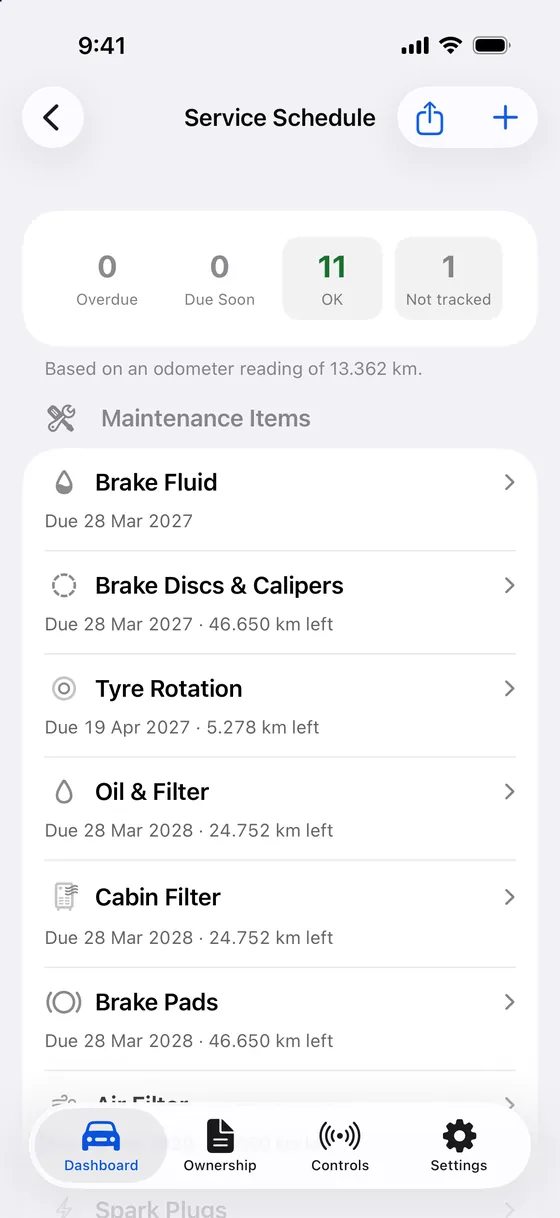
Ownership, Services tab: the Service Schedule with the next service, brake fluid, then four dates required by law in Romania, tracked: driving licence, periodic inspection (ITP), third-party insurance (RCA) and the road vignette, each with its due date.

Parking

Back to your car.

A full-screen map of the last position your car reported. Directions opens your preferred maps app.
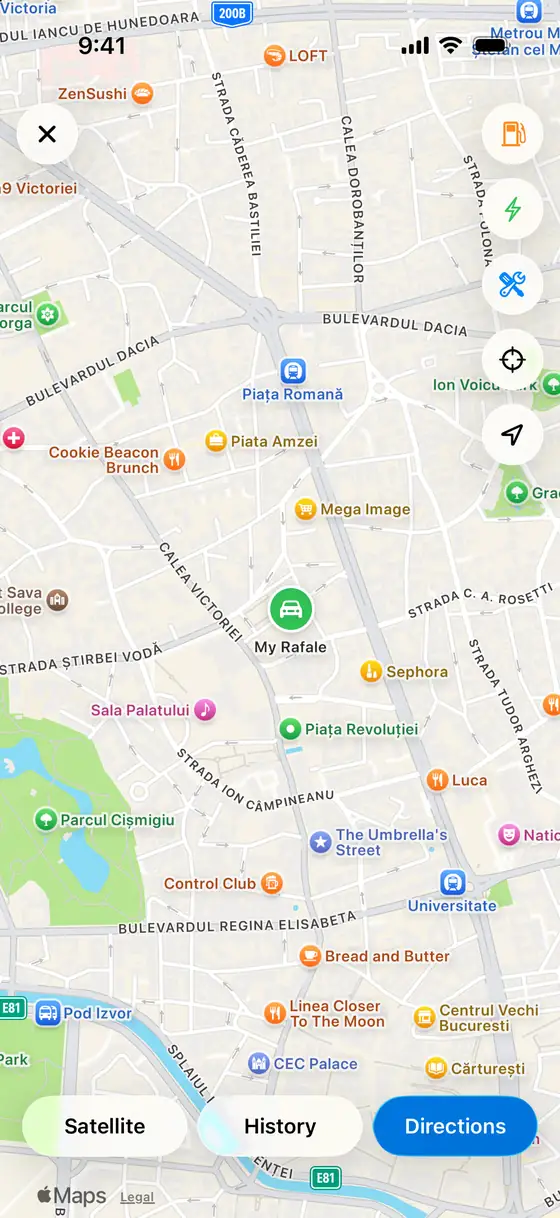
Full-screen map of central Bucharest with the parked car near Piața Revoluției, nearby places, and Satellite, History and Directions buttons.

Take it for a spin.

Tap through Riviera in your browser. Nothing to install, and no account needed.

Try Riviera

The finer points.

The history behind the numbers. And your car, without opening the app.

Fill-ups

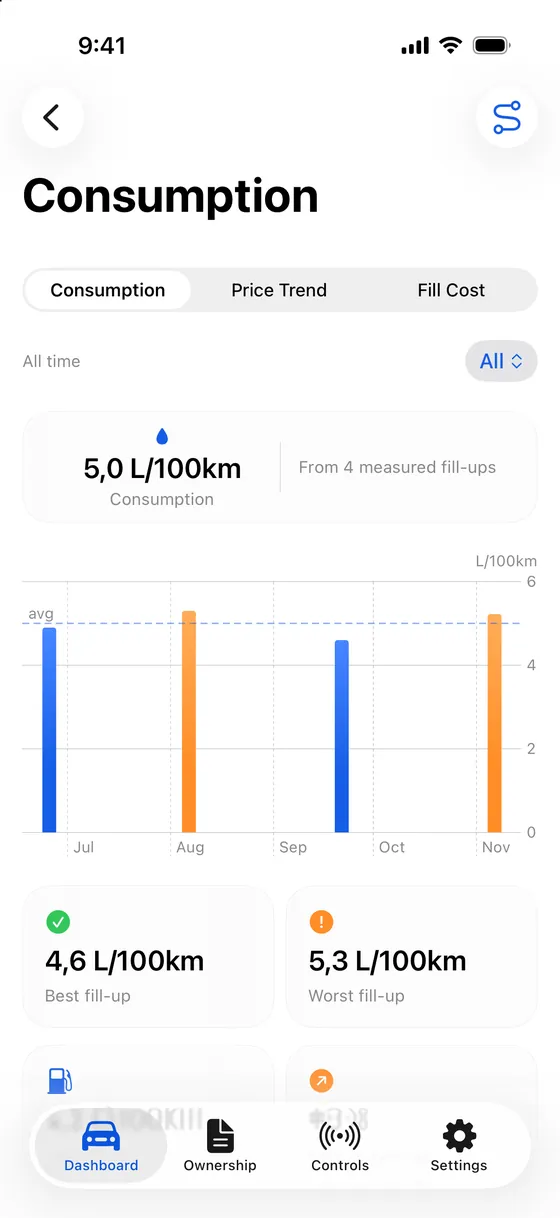
Consumption, fill-up by fill-up.

Type a fill-up or scan a Romanian or English receipt, then follow consumption and fuel cost.

Consumption: the average from four measured fill-ups, a chart of each fill-up by month, and the best and worst fill-up, with tabs for the price trend and the cost of each fill-up.

Mileage

Your odometer, over time.

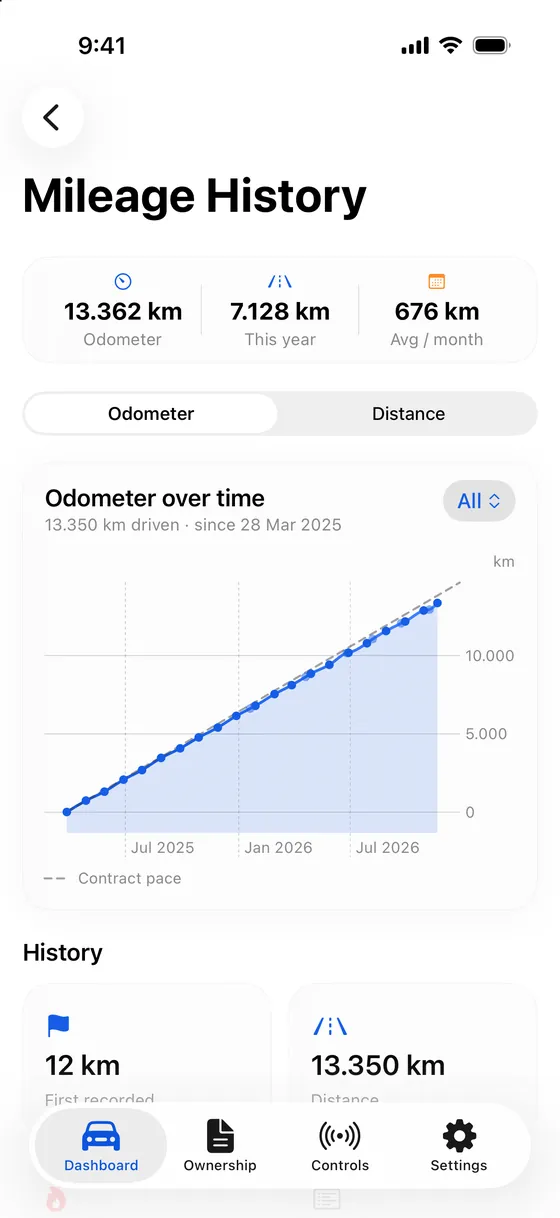
Distance this year and the monthly average, on a chart.

Mileage History: odometer, distance this year and monthly average, with a chart of the odometer over time next to the contract pace.

Service Schedule

Every service item, on one list.

Tyres, brake fluid, filters and more, with due dates, the distance left and a tap to add it to Calendar and Reminders.

Service Schedule: nothing overdue or due soon, eleven items on schedule and one not tracked, with due dates and, for most, the distance left; brake fluid, first, has a date only.

Parking History

Where you parked before.

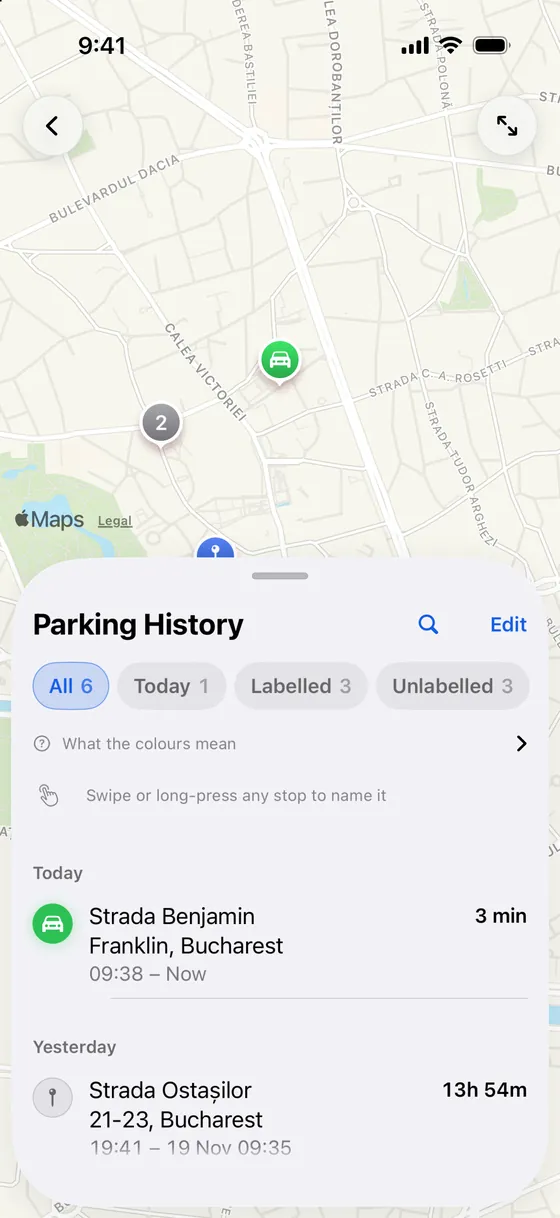
Up to 90 days of places your car reported, kept on your iPhone and named as you like.

Parking History: six stops, three of them named, by street and time, with today’s stop on Strada Benjamin Franklin first, and search, filters and an edit button.

Widgets

Parked, on your Home Screen.

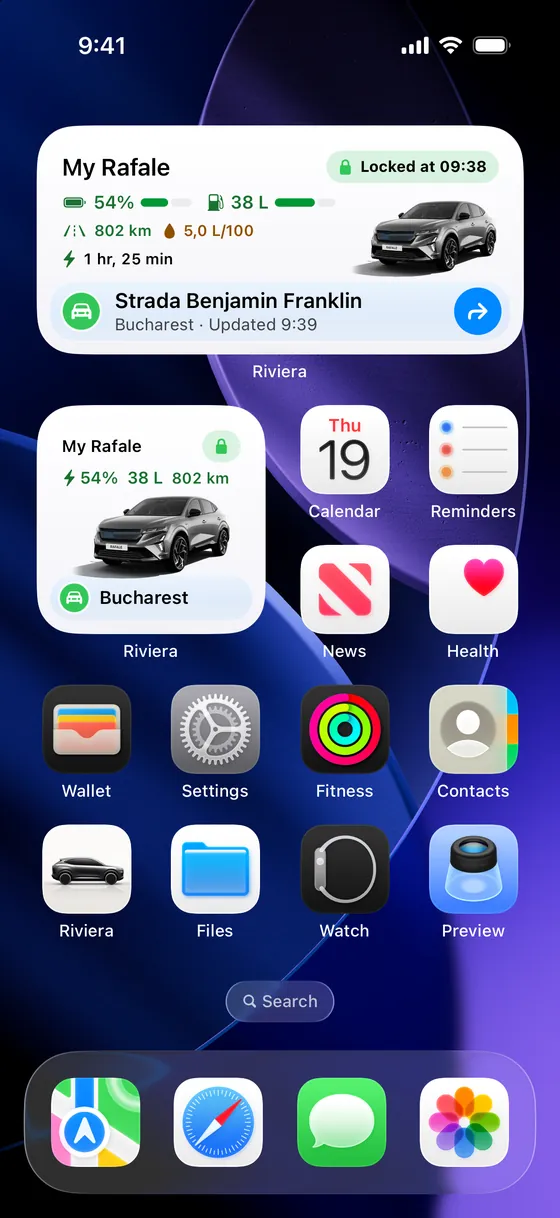
The Parking Location widget shows your car, its charge, fuel and range, the lock status where reported and, if you allow it, the address, with Directions on medium and large.

Two Riviera widgets on the Home Screen, each with a front view of the car. The medium one shows battery and fuel levels, range, consumption, charging time left, the lock status with its time, the parking street and a Directions button. The small one shows the levels, range, a lock icon and the city.

Shortcuts

Set it up once.

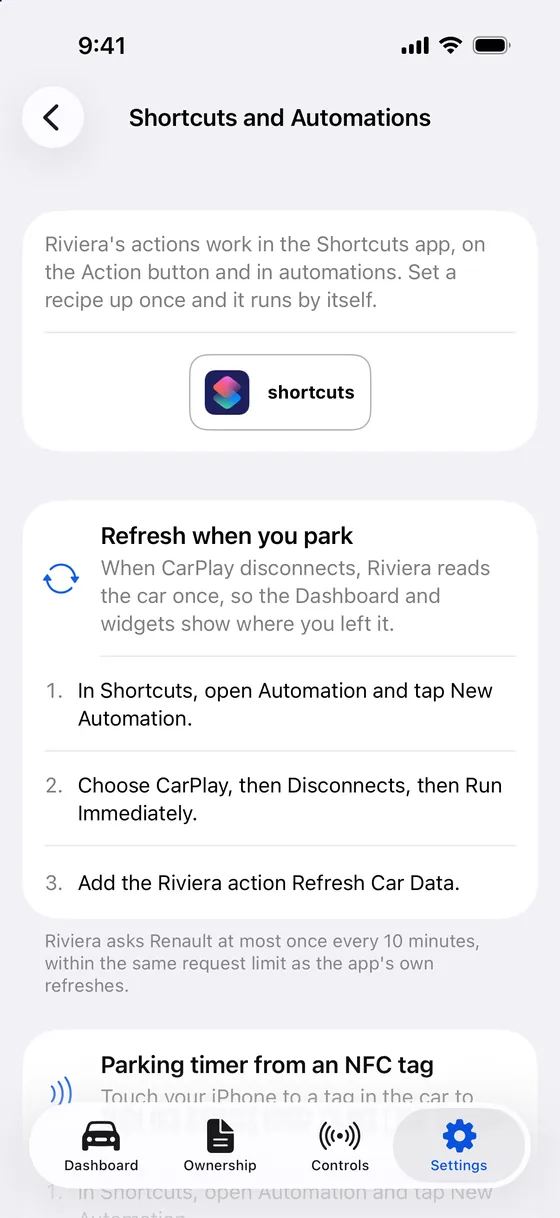
Have Riviera read the car when CarPlay disconnects, or start a parking timer by touching an NFC tag.

Shortcuts and Automations help: Riviera’s actions in the Shortcuts app, a recipe that reads the car when CarPlay disconnects, and a parking timer started from an NFC tag.

Themes

Make it yours.

Three colour themes for the Dashboard and the rest of the app, and the app icon changes with the theme.

The Dashboard in a dark blue colour theme: small stars in the sky above the car and a thin horizon line under it, the lock status, then range, battery and fuel levels, consumption and odometer on dark cards.

There is more.

What you get depends on your car and your country.

Around your car

Nearby fuel, charging and dealers.

Fuel stations near your car, with prices in France, Spain, Austria and Romania. In Germany, prices appear with your own free Tankerkönig key.4

EV chargers and Renault dealers near your car or your phone, on a map.

Records

Repairs, tyre sets and notes.

Switch on iCloud Sync or save a backup file. Share a car’s records with people you invite in a Shared Garage, including its VIN and its lease and credit details.

Everyone you invite can read and change them.

No Renault account yet?

Try it with a sample car.

Tap “Try it with a sample car” on the sign-in screen to explore the app with a fictional car. No account, no password.

Records you add there are not saved.

Apple TV

A summary on your TV.

Install the optional Apple TV app. Then switch on “Show my car on Apple TV” in Settings › Data & Sync › Apple TV.

Arrives with the App Store release. Requires tvOS 18 or later.

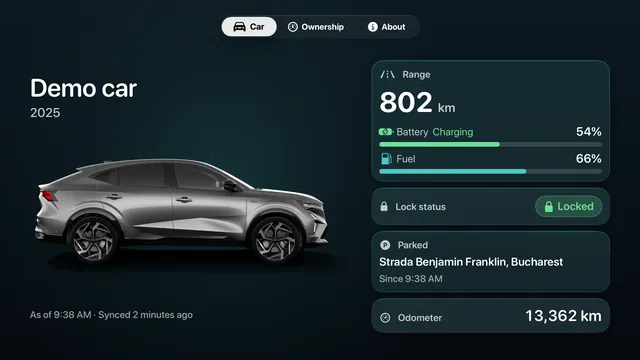
The Apple TV app’s Car screen: range, battery level while charging, fuel level, lock status, parking place and odometer.

Privacy

Your records stay with you.

On your iPhone, plus any backups and features you switch on.

No server of its own. No analytics. No ads.

  • No server of its own

    Riviera has no server of its own, no analytics and no ads.

  • Your password

    Your My Renault password goes only to Renault’s sign-in service. Riviera never saves it.

  • Your records

    Your records stay on your iPhone, and in the iPhone backups you make, unless you switch on a feature that copies them, such as iCloud Sync, Shared Garage or Apple TV.

  • Your location

    Fuel, charger and dealer searches send a position rounded to about 100 metres to the public services that answer them. Weather lookups send a position rounded to about 10 kilometres. Apple Maps and Apple’s address lookup, which Riviera also uses, receive exact coordinates. The policy lists every service.

  • Erasing

    Erase what Riviera keeps on your iPhone and in your own iCloud from inside the app, without asking the developer. Backups, a Shared Garage you joined and data held by Renault are not touched. The policy lists what remains.

  • The developer

    Riviera itself sends nothing to the developer. What reaches the developer is what you choose to email, plus anonymous crash and usage figures that Apple shares with developers if you allow it in iOS.

The short version. The full privacy policy is the one to rely on.

Read the full privacy policy

Good to know.

What to expect.

  • Renault cars only.

    Your car needs to be connected to a My Renault account. What shows depends on your market, model year, connected-services subscription and privacy mode. Riviera hides the readings your car does not report.

  • Readings can arrive late or be missing.

    They come from Renault’s servers. Riviera is not a safety system. Its deadlines are estimates and reminders, not legal advice.

  • Requirements.

    An iPhone with iOS 18 or later. The optional Apple TV app requires tvOS 18 or later.

  • Free.

    No ads, no subscription and no paid features.

Questions.

Short answers. More in the app, under Settings › Help & Support.

Is Riviera an official Renault app?

No. Riviera is independent and unofficial. It is not affiliated with, endorsed by, or sponsored by Renault s.a.s. It uses the same sign-in and vehicle-data services as the official My Renault app, with your own account.

Can Riviera lock or unlock my car?

No. Renault’s service has no such command. Riviera shows only the last lock status your car reported, with the time of that report. It can sound the horn and flash the lights where Renault allows that for your car.

What happens to my password?

Riviera is not Renault’s own app, so you type your My Renault password into a third-party app. You type it only on Riviera’s sign-in screen. It goes only to Renault’s sign-in service, and Riviera does not save it. Riviera keeps Renault’s sign-in token, your email address and your account IDs, among a few other items listed in the privacy policy, in the iOS Keychain on your iPhone. iOS itself may offer to save the password in your own password manager. That is your choice.

Why doesn’t my car’s data update every minute?

Riviera reads your car through Renault’s servers, which limit how often an account may ask. The car also needs a mobile signal. Pulling down on the Dashboard asks Renault for the latest reading, at most once every 30 seconds.

Which cars does Riviera work with?

Renault cars that appear in your My Renault account. Features vary by model. Climate and charging controls need a plug-in or electric car. On some newer electric models, such as the Renault 4 and 5, Renault does not accept the charging commands Riviera sends, so charging features are limited on those models. Some markets have no connected services at all.

What does Riviera cost?

Riviera is free: no ads, no subscription and no paid features. Renault’s connected services are separate and may have their own terms.

Contact.

Questions, bug reports or ideas? Write in English or Romanian. The developer reads every message and replies as soon as possible.

riviera.appsupport@icloud.com

In the app: Settings › Help & Support › Report a Problem. You see the redacted diagnostics before anything is sent.

Riviera is made and published by Ionuț Andrei Paraschiv, Romania. For questions about your My Renault account, your car or its subscription, contact Renault or your dealer.

Riviera

Install with TestFlight

App Store release coming soon

For iPhone with iOS 18 or later. Free, with no ads.

Independent and unofficial. Not affiliated with, endorsed by, or sponsored by Renault s.a.s.